
Hey there, creative soul! 🌟 Ready to level up your digital art game? We’re diving back into the magical universe of jyllyco with Part 2 of this incredible collection. Whether you’re a seasoned Procreate wizard or just starting your artistic journey, these tools are designed to make your workflow smoother, your colors bolder, and your lettering more charming than ever. Get ready to sprinkle some serious creativity into your projects! 🚀🎨
Why Use These jyllyco Creations?
jyllyco doesn’t just make brushes; they craft experiences. Each tool in this collection is built to save you time while unleashing maximum creative potential. From instant gradient magic to whimsical handwritten alphabets, these assets are perfect for everything from journaling and branding to social media graphics and intricate illustrations. Trust me, your iPad is about to become your new best friend! ✨
Top 6 jyllyco Collection Picks
Procreate Color sets to Create Gradients

Oh, the colors! 🌈 This set is an absolute dream for anyone who loves smooth, dreamy gradients. With these pre-curated color palettes, you’ll never have to guess which hues blend perfectly again. Just drag, drop, and watch your art come to life with stunning transitions! It’s like having a color theory expert living inside your iPad. 💫
Procreate Alphabet Stamp Brush3

Get ready to fall in love with stamping all over again! 🖋️ The Brush3 version brings a whole new level of handwritten charm to your projects. Each letter feels like it was written with love, giving your quotes, titles, and labels that cozy, personal touch. This is the perfect set for bullet journal lovers and hand-lettering enthusiasts! ✨
Procreate Alphabet Stamp Brush1

This one is a true classic! 🏆 The Brush1 set is full of playful, bouncy letters that instantly add personality to any design. Whether you’re creating a birthday card, a social media post, or a fun sign, these stamps make it feel like you spent hours lettering by hand. Plus, it includes numbers too! Talk about versatile magic. 🎉
Procreate Alphabet Stamp Brush

The original gem of the alphabet stamp family! 💎 This set is all about fun, flair, and flexibility. The letters have a slightly rugged, hand-drawn feel that makes your text look super authentic and artsy. It’s ideal for scrapbooking, custom logos, or simply adding a dash of whimsy to your illustrations. Seriously, one tap and you’ll be addicted! 😍
Procreate 46 Fun Brushes
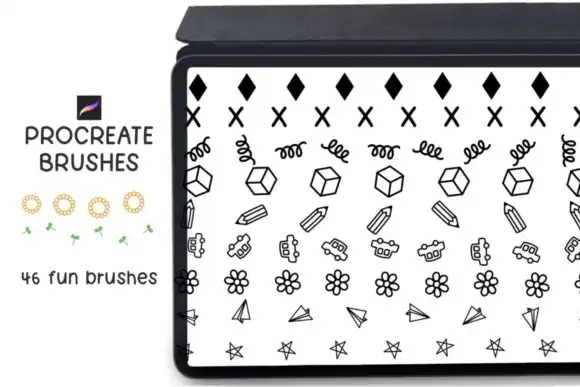
Okay, this one is just pure joy in a digital bundle! 🎉 46 unique brushes that range from quirky textures to playful splatters and dreamy effects. It’s like a treasure chest of creativity – every brush feels like a new toy waiting to be explored. Whether you want to add sparkles, grunge, or soft watercolor vibes, this pack has your back. Get ready to have way too much fun! 🤪✨
Free Procreate Alphabet Stamp

Yes, you read that right – FREE! 🆓🎁 This fantastic alphabet stamp set is the perfect way to dip your toes into the jyllyco universe without spending a dime. It features beautifully hand-drawn letters that add that heartwarming, analog feel to your digital work. Perfect for students, hobbyists, or anyone who loves a good freebie with premium quality! 😊
Conclusion
There you have it, friends! The jyllyco Collection Part 2 is bursting with color, charm, and endless possibilities for your Procreate projects. From stunning gradients to the most adorable alphabet stamps, these tools will not only save you time but will also infuse your art with pure personality. So go ahead, grab your favorites, and let your creativity run wild! 🌟🎨
Frequently Asked Questions
Can I use these jyllyco brushes on other apps besides Procreate?
These brushes are specifically designed and optimized for the Procreate app on iPad. While some stamp sets might be compatible with other apps that support .brush files, the best experience is always on Procreate. 😊
Are the alphabet stamps easy to resize and recolor?
Absolutely! One of the best things about jyllyco’s stamps is that they’re fully editable. You can easily adjust the size, change colors, and even rotate them on your canvas. Just tap on the layer and play around – it’s super intuitive! ✨



