
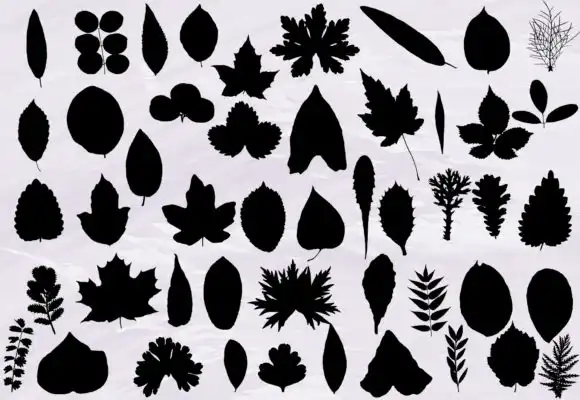
Leaf Photoshop Brushes Set Silhouette

$1.00

Tive Create
Product Specs
- Compatible with: Adobe Photoshop
- File Type: zip
- Instant Download
- File Size: 3 MB
Leaf Photoshop Brushes Set Silhouette is the perfect digital download for creatives looking to add a touch of nature to their artwork! 🌿 With instant access, you can start creating stunning designs right away. This brush set is specifically designed for Adobe Photoshop, making it a must-have for any graphic designer or artist.
Product Overview
Immerse yourself in the beauty of nature with our Leaf Photoshop Brushes Set Silhouette! This delightful collection features beautifully crafted leaf silhouettes that are ideal for enhancing your digital artwork. Whether you’re working on illustrations, graphic designs, or any creative projects, these brushes will bring your ideas to life. 🌳✨
Key Features & Benefits
- High-Quality Brush Files: Each brush is meticulously designed to ensure smooth and natural strokes, allowing for seamless integration into your projects.
- Instant Download: Get started immediately! Your brushes are available for download as soon as you complete your purchase.
- Compatible with Adobe Photoshop: Specifically created for use in Photoshop, making it easy to incorporate into your workflow.
- Versatile Use: Perfect for a variety of projects, including digital illustrations, graphic designs, and more!
Technical Specifications
| Specification | Details |
|---|---|
| Compatible with | Adobe Photoshop |
| File Type | zip |
| Instant Download | Yes |
| File Size | 3 MB |
What’s Included
- ABR (Photoshop brush file)
Perfect For
This brush set is ideal for:
- Graphic Designers
- Illustrators
- Nature Lovers
- Digital Artists
- Anyone looking to create beautiful foliage designs!
FAQ
Is this a physical product? No, it’s a digital download!
How do I use the brushes with Photoshop?
- Unzip the file you have downloaded.
- Double click on the ABR file.
- Photoshop will open, and the brushes will already be loaded.
- Be creative! 🌈
How do I use the brushes with GIMP?
- Search under your local disks for the folder GIMP 2 (may be under the Program Files folder).
- Follow the path GIMP 2 -> share -> gimp -> 2.0 -> brushes.
- Unzip the file you have downloaded.
- Copy the ABR file and paste it in the brushes folder.
- Be creative! 🎨
Visit our shop for more brush bundles and keep your creative juices flowing!
User Reviews
Be the first to review “Leaf Photoshop Brushes Set Silhouette”
You must be logged in to post a review.




There are no reviews yet.