
Hair Colors Procreate Color Palette
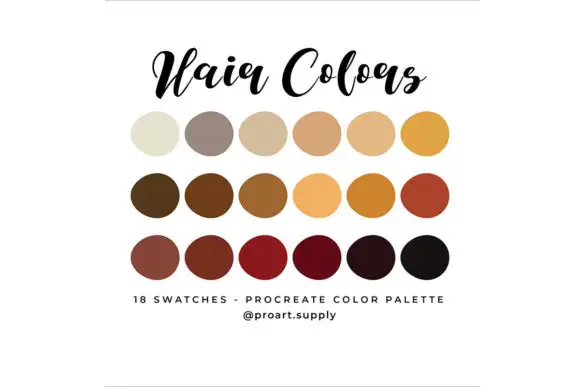
Original price was: $1.00.$0.50Current price is: $0.50.

Digital Art Supply
Product Specs
- Compatible with: Procreate
- File Type: zip
- Instant Download
- File Size: 5 KB
🎨 Introducing the Hair Colors Procreate Color Palette! This delightful digital download offers instant access to a vibrant selection of hair colors, perfect for any creative project. With just a few clicks, you can add a splash of color to your illustrations and digital art using Procreate!
Product Overview
The Hair Colors Procreate Color Palette is designed specifically for artists who want to achieve stunning hair effects in their digital creations. This palette includes a variety of hair tones, from rich dark browns to radiant blondes, ensuring you have the perfect shades at your fingertips. Whether you’re working on character designs, portraits, or fantasy illustrations, this palette is your go-to resource for hair colors in Procreate.
Key Features & Benefits
- Variety of Shades: Includes Dark Brown, Light Brown, Blonde, Gray, and Red, allowing for versatile hair color options in your artwork.
- User-Friendly: Easily import the palette into Procreate with simple steps, making it accessible for artists of all levels.
- Instant Access: Download and start using the palette immediately, enhancing your creative workflow.
- Compatible with Procreate: Specifically designed for seamless integration with the Procreate app, ensuring a smooth experience.
Technical Specifications
| Specification | Details |
|---|---|
| Compatible with | Procreate |
| File Type | zip |
| Instant Download | Yes |
| File Size | 5 KB |
What’s Included
- 1 .swatches file
Perfect For
This palette is ideal for illustrators, digital artists, and anyone using Procreate who wants to add realistic hair colors to their creations. Whether you’re a hobbyist or a professional, this resource will help you achieve stunning results!
FAQ
- Is this a physical product? No, it’s a digital download!
- How do I download the Procreate color palette into the app?
Follow these simple steps to import your new hair color Procreate palette:
- Download the zip folder on your computer.
- Extract the .swatches file (this can only be done on a computer).
- Send the .swatches file to your Apple device.
- Open the My Files App on your Apple device.
- Find and tap on the .swatches file.
- The file will automatically import into the Procreate app. If not, select export to Procreate.
- The palette will show up all the way at the bottom of the Palettes section in your Procreate App.
Now you’re ready to create with the Hair Colors Procreate Color Palette! 🌈
User Reviews
Be the first to review “Hair Colors Procreate Color Palette”
You must be logged in to post a review.

Cloudberry Procreate Color Palette
Sold by Digital Art Supply
Champagne Procreate Color Palette
Sold by Digital Art Supply
Rustic Procreate Color Palette
Sold by Digital Art Supply
SUNRISE PROCREATE Color Palette
Sold by Digital Art Supply
Cactus Procreate Color Palette
Sold by Digital Art Supply
South Beach Procreate Color Palette
Sold by Digital Art Supply Original price was: $1.00.$0.50Current price is: $0.50.


There are no reviews yet.