
Guardian 3 Photoshop Action
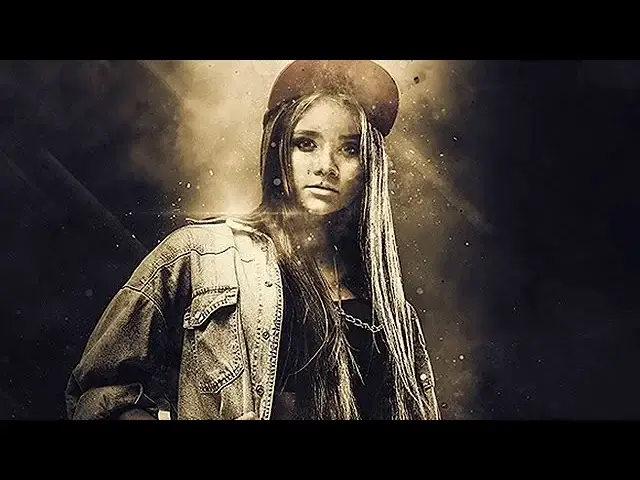


Original price was: $5.00.$2.50Current price is: $2.50.

ihemalaya
Product Specs:
- Compatible with: Actions
- File Type: ZIP
- File Size: 11.1 MB
- Instant Download
Guardian 3 Photoshop Action: Elevate Your Photo Manipulation
Transform your images with the Guardian 3 Photoshop Action, designed to create stunning photo manipulation artworks. This action incorporates elements like smoke, lights, and clouds, combined with exceptional color grading to evoke a theme of suspense and intrigue. Whether you’re a designer or photographer, this tool is perfect for crafting eye-catching visuals that stand out.
Product Overview
The Guardian 3 Photoshop Action is tailored for creatives seeking to enhance their projects with unique effects. Its user-friendly design allows anyone to produce professional-quality artworks without needing advanced skills. Ideal for creating CD covers, posters, flyers, and social media graphics, this action opens up a world of creative possibilities.
Key Features & Benefits
- ✅ Compatibility: Works with Photoshop CS3 & higher versions, ensuring accessibility for a wide range of users.
- ✅ Multilingual Support: Functions in all Photoshop languages, making it convenient for global users.
- ✅ User-Friendly: Fast and easy to use, allowing you to create stunning effects in just a few clicks.
- ✅ Non-Destructive: Preserves your original images, enabling you to experiment without worry.
- ✅ Comprehensive Help File: Comes with detailed instructions to guide you through the process.
Why Choose This Product
The Guardian 3 Photoshop Action stands out due to its versatility and ease of use. It’s trusted by designers and photographers alike for its ability to produce visually striking results quickly. With a simple application, you can elevate your projects and capture the attention of your audience, making it a valuable addition to your creative toolkit.
Specifications
| Compatibility | Photoshop CS3 & Higher |
|---|---|
| Languages | All Photoshop Languages |
| File Type | Photoshop Action (.atn) |
What’s Included
- 📦 Guardian 3 Photoshop Action file
- Help file with instructions
- Access to tutorial video
Perfect For
- Graphic Designers
- Photographers
- Social Media Managers
- Marketing Professionals
- Anyone looking to enhance their visual content
How to Use
To get started with the Guardian 3 Photoshop Action, follow these quick steps:
- Open your image in Photoshop.
- Load the action from the Actions panel.
- Click on the action to apply the effects.
- Adjust settings as needed to achieve your desired look.
FAQ
- Is this action suitable for beginners? Yes, it’s designed to be user-friendly, requiring no professional skills.
- Can I use it for commercial projects? Absolutely! You can use the created artworks for any commercial purposes.
Add to cart now and start creating stunning visuals today! 🚀
User Reviews
Be the first to review “Guardian 3 Photoshop Action”
You must be logged in to post a review.

Toon-Me Photoshop Action – Cartoonize 2
Sold by ihemalaya
Adobe Photoshop Actions and Presets Bundle – 64 Items
Sold by ihemalaya
Impressionist Watercolor Photoshop Action
Sold by ihemalaya
Blasting Photoshop Action
Sold by ihemalaya
TypoMix 2 Photoshop Action
Sold by ihemalaya
Vintage Old Photo PSD Effect
Sold by ihemalaya Original price was: $5.00.$2.50Current price is: $2.50.


There are no reviews yet.