
Digital Sketch Photoshop Action

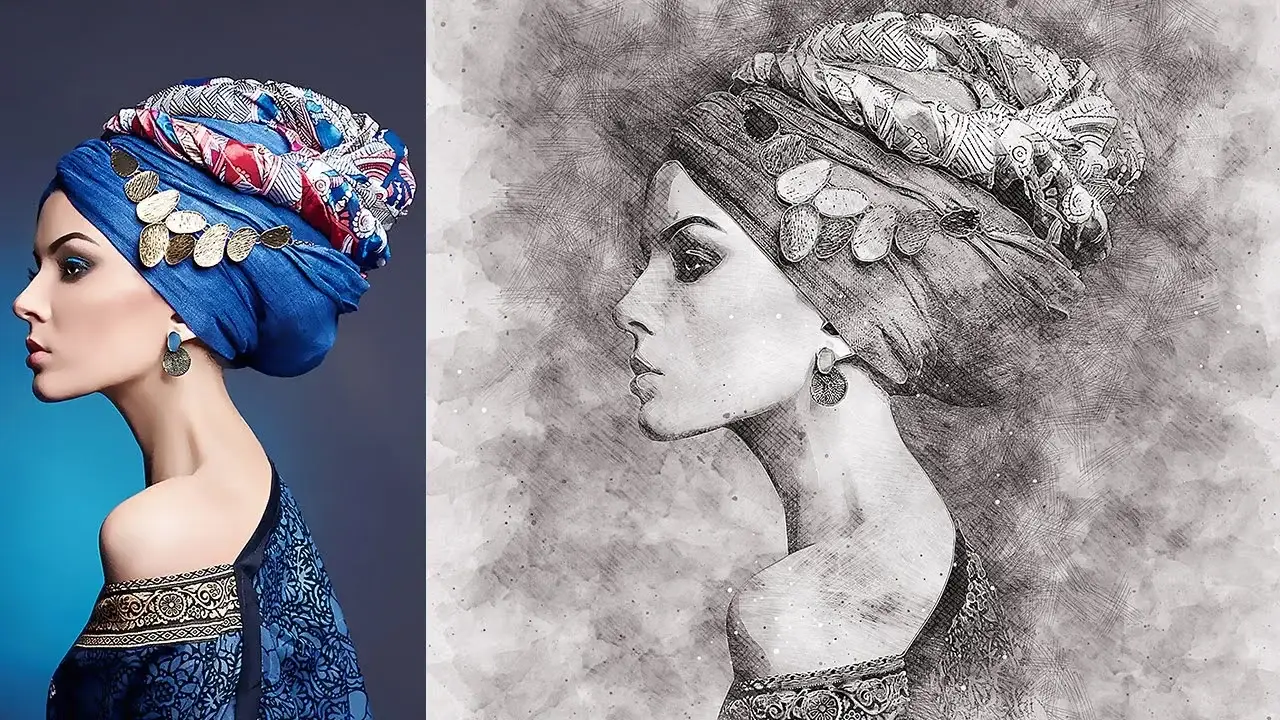
Original price was: $5.00.$2.50Current price is: $2.50.

ab-thedesigner
Product Specs:
- Compatible with: Actions
- File Type: ZIP
- File Size: 17.2 MB
- Instant Download
Digital Sketch Photoshop Action
Transform your photos into stunning artistic sketches with the Digital Sketch Photoshop Action. This innovative action combines pencil hatching, watercolor effects, and realistic sketching techniques to create a professional finish. You will enjoy complete control over the final result with fully editable layers, colors, and elements, allowing you to customize your artwork effortlessly.
Product Overview
The Digital Sketch Photoshop Action is designed for artists, photographers, and designers who want to add a unique touch to their digital images. Whether you’re looking to create a hand-drawn look or a watercolor effect, this action provides an easy solution to elevate your artwork.
Key Features & Benefits
- ✅ Professional Artistic Effect → Achieve a high-quality sketch look that enhances your images.
- ✅ Fully Editable Layers → Customize colors and elements to suit your style.
- ✅ Easy to Use → Follow the included video tutorial for simple setup and customization.
- ✅ Versatile Styles → Perfect for various art applications, from digital illustrations to photo editing.
- ✅ Comprehensive Support → Access help files and tutorials to ensure a smooth experience.
Why Choose This Product
The Digital Sketch Photoshop Action stands out due to its combination of artistic effects and user-friendly features. Trusted by artists worldwide, it simplifies the creative process, allowing you to focus on your vision. With this action, you can effortlessly create captivating sketches that impress clients and audiences alike.
Specifications
| File Type | .atn, .abr, .pat, .txt |
|---|---|
| Compatibility | Adobe Photoshop |
| Included Files | Action file, Brushes, Patterns, Help file |
What’s Included / What’s in the Box
- 📦 1 Action (.atn) file
- 📦 1 Brushes (.abr) file
- 📦 1 Patterns (.pat) file
- 📦 1 Help (.txt) file
Perfect For
- Artists looking to enhance their digital artwork
- Photographers wanting to create unique photo effects
- Designers seeking to add a hand-drawn aesthetic to their projects
How to Use
Follow these simple steps to get started:
- Open your image in Adobe Photoshop.
- Load the Digital Sketch Action.
- Run the action and adjust the settings as desired.
- Customize colors and layers to finalize your artwork.
FAQ
- Do I need advanced Photoshop skills to use this action? No, the action is designed for users of all skill levels, with a video tutorial provided.
- Can I use this action on any image? Yes, it works well with various image types, but results may vary based on the original photo quality.
Add to cart now and start creating stunning sketches today! 🚀
User Reviews
Be the first to review “Digital Sketch Photoshop Action”
You must be logged in to post a review.
Digital Art Photoshop Action
Sold by ab-thedesigner
True Watercolor Photoshop Action
Sold by ab-thedesigner
Digital Pencil Photoshop Action
Sold by ab-thedesigner

Watercolor & Pencil Photoshop Action
Sold by ab-thedesigner
Retro Poster Photoshop Action
Sold by ab-thedesigner Original price was: $5.00.$2.50Current price is: $2.50.


There are no reviews yet.