
Bokeh Photoshop Action


Original price was: $11.00.$2.50Current price is: $2.50.

NMC 2010
Product Specs:
- Compatible with: Actions|Adobe Photoshop
- File Type: ZIP
- File Size: 292.8 KB
- Instant Download
Are you ready to sprinkle some magic on your photos? The Bokeh Photoshop Action is here to help you create mesmerizing bokeh effects with just a click! 🌟 This digital download offers instant access, allowing you to dive straight into enhancing your photography with dreamy, soft-focus lights and blurs that truly make your images pop!
Product Overview
This powerful Photoshop action is perfect for photographers looking to add that extra flair to their work. Whether you’re capturing portraits, landscapes, or artistic shots, the Bokeh Photoshop Action is designed to elevate your images to new heights. ✨ With its user-friendly interface, you’ll be able to achieve stunning results in no time!
Key Features & Benefits
- One-click bokeh effect application: Effortlessly apply beautiful bokeh effects to your photos with just a single click!
- Customizable layers: Enjoy full creative control by adjusting layers to suit your unique style.
- High-resolution output: Perfect for professional editing, ensuring your images look sharp and vibrant.
- Versatile usage: Works wonderfully on portraits, landscapes, and artistic photography, making it a must-have for all photographers.
- Non-destructive editing: Keep your original image intact while experimenting with different bokeh effects.
Technical Specifications
| Specification | Details |
|---|---|
| Compatible with | Software |
| File Type | ZIP |
| File Size | 292.8 KB |
| Instant Download | Yes |
What’s Included
- Bokeh Photoshop Action file (.ATN)
- Step-by-step installation and usage guide
- Example image files to practice on
Perfect For
This action is ideal for photographers, graphic designers, and anyone looking to enhance their images with stunning bokeh effects! 🌈 Whether you’re a beginner or a pro, this action will help you create beautiful, eye-catching visuals that stand out.
FAQ
- Is this a physical product? No, it’s a digital download!
- Can I use it on multiple images? Absolutely! Apply the bokeh effect to as many images as you like.
- What is bokeh effect in photography? Bokeh refers to the aesthetic quality of the blur produced in the out-of-focus parts of an image, creating a beautiful and soft background.
- How to add bokeh in Photoshop? Simply install the action, load your image, and let the Bokeh Photoshop Action do the magic for you!
User Reviews
Be the first to review “Bokeh Photoshop Action”
You must be logged in to post a review.


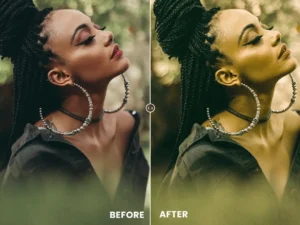
Green Tones Effect Action & Lightrom Presets
Sold by NMC 2010
Blossom Action & Lightrom Presets
Sold by NMC 2010
Shiny Action & Lightrom Presets
Sold by NMC 2010 Original price was: $11.00.$2.50Current price is: $2.50.


There are no reviews yet.