Welcome to the creative world of elizmill, a talented designer known for crafting intuitive, high-quality digital brushes for both Procreate and Clip Studio Paint. Whether you’re a portrait artist perfecting a soft, airbrushed look or an illustrator building crisp, expressive line art, elizmill’s collection offers the perfect toolkit to elevate your workflow.
From the dreamy, blending-focused «Soft Art» Brushes to the playful Magic Line Art and even a unique 2-in-1 set that adds rain textures to your line art, each brush is designed with precision and artistic flair. Below, we break down the essential packs every digital artist should consider adding to their library.
Why Elizmill Brushes Stand Out
Each elizmill brush set is tailored to solve real creative challenges. The soft art brushes deliver seamless blending and a painterly finish perfect for skin tones and atmospheric scenes. The line art brushes offer responsive, clean strokes—ideal for inking and manga-style drawing.
Several sets include unique bonuses like Sweet Skin Swatches or rain texture overlays, giving you both drawing tools and finishing effects in one download. All brushes are optimized for their respective software (Procreate or Clip Studio Paint), with instant ZIP downloads and small file sizes for quick, hassle-free installation.
Featured Products in elizmill Collection
1. «Soft Art» Brushes for PROCREATE
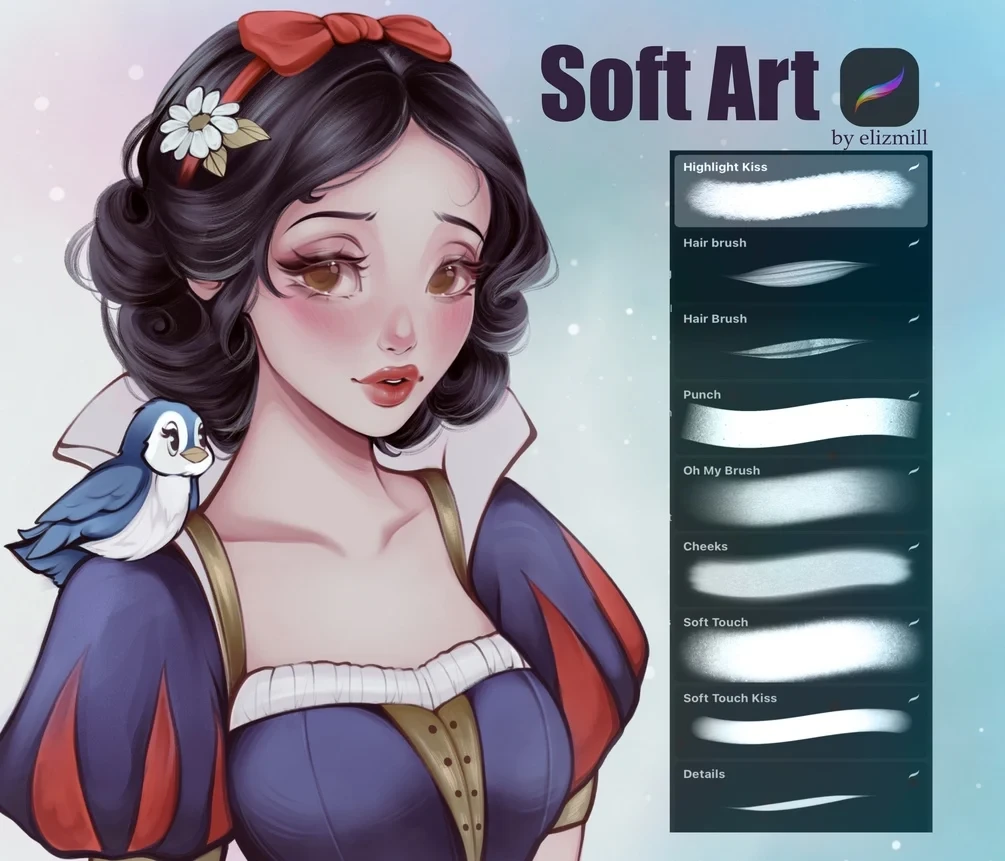
Product Specs:
- Compatible with: Software
- File Type: ZIP
- File Size: 6.3 MB
- Instant Download
Create stunning, soft-focus digital paintings with the «Soft Art» Brushes for PROCREATE. This premium brush set gives you 9 versatile tools for smooth blending, soft shading, and painterly rendering, plus a bonus Sweet Skin Swatches palette. Whether you're a portrait artist or illustrator, these Procreate soft brushes help you achieve that dreamy, airbrushed look with ease. Product Overview The «Soft Art» Brushes are a curated collection of digital art brushes designed exclusively for Procreate on iPad. Each brush is optimized…
2. Line Art Brushes for Clip Studio Paint by elizmil
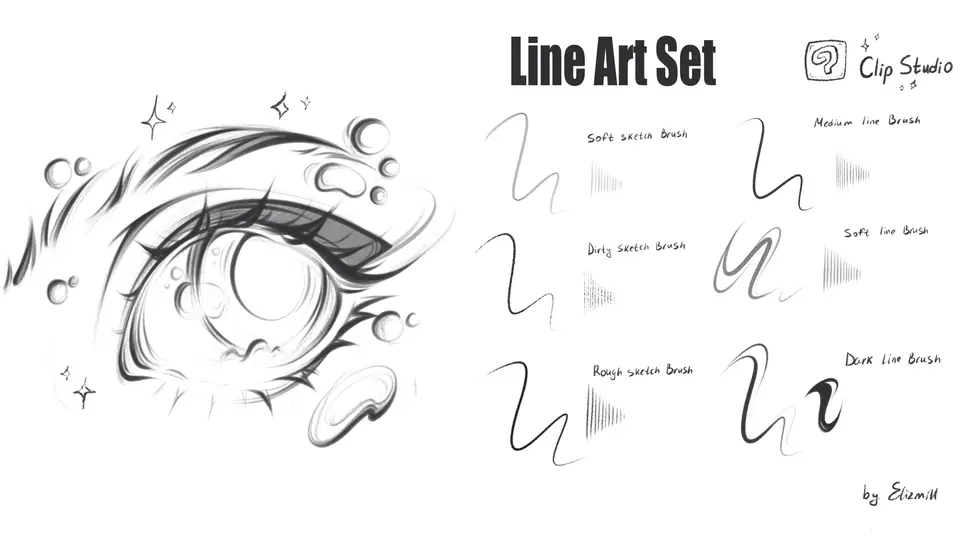
Product Specs:
- Compatible with: Clip Studio Paint
- File Type: zip
- Instant Download
- File Size: 4.23 MB
Say hello to your new favorite creative companion! 🎉 The Line Art Brushes for Clip Studio Paint by elizmil is a delightful digital download that instantly adds a touch of magic to your artwork. Whether you're an experienced artist or just starting, these brushes will take your line art to the next level! ✨ Product Overview Designed specifically for Clip Studio Paint , these brushes are perfect for creating stunning line art. With a collection of 6 custom brushes, you…
3. Magic Line Art Brushes for Procreate

Product Specs:
- Compatible with: Procreate
- File Type: zip
- Instant Download
- File Size: 41.8 MB
Welcome to the magical world of creativity! ✨ The Magic Line Art Brushes for Procreate offer a delightful set of 10 brushes designed specifically for creating stunning line art with a twist. This digital download is available instantly, allowing you to jump right into your artistic journey!
4. 2 in 1 – Line Art Set and Add Rain Textures for PROCREATE

Product Specs:
- Compatible with: Procreate
- File Type: zip
- Instant Download
- File Size: 9 MB
Are you ready to add a splash of creativity to your digital art? The 2 in 1 – Line Art Set and Add Rain Textures for PROCREATE is here to inspire your next masterpiece! This delightful digital download offers instant access to a unique collection of brushes that will take your Procreate creations to new heights. 🎨✨
5. «Soft Art» Brushes for PROCREATE

Product Specs:
- Compatible with: Procreate
- File Type: zip
- Instant Download
- File Size: 6.32 MB
Are you ready to bring your digital art to life with the perfect tools? Our «Soft Art» Brushes for PROCREATE are here to help you create stunning, soft textures with ease! This digital download provides instant access to a delightful set of brushes designed specifically for Procreate, making your creative journey even more exciting! 🎨✨
Start Your Next Masterpiece
Whether you’re aiming for soft, ethereal portraits or bold, whimsical line art, the elizmill collection delivers reliable, beautiful results. Each brush set is a complete toolkit—no extra plugins needed—so you can focus on creating. Browse the packs above and bring more magic to your digital canvas today.
Frequently Asked Questions
Are these brushes compatible with both iPad Procreate and desktop Clip Studio Paint?
Most elizmill sets are designed for a specific software. The «Soft Art» Brushes, Magic Line Art, and the 2-in-1 Set are all for Procreate (iPad). The Line Art Brushes are exclusively for Clip Studio Paint (desktop/tablet). Always check the “Compatible with” spec before purchasing.
How do I install the brushes after downloading the ZIP file?
For Procreate, simply download the ZIP, unzip it, and tap the brush file (.brushset or .brush) to import. For Clip Studio Paint, unzip and import the brush file (.sut or .zip) via the “Import” tool in the Brush palette.
Can I use these brushes for commercial artwork?
Yes, elizmill brushes are licensed for both personal and commercial use. You may use them to create and sell your own artwork. Redistribution or resale of the brush files themselves is not permitted.